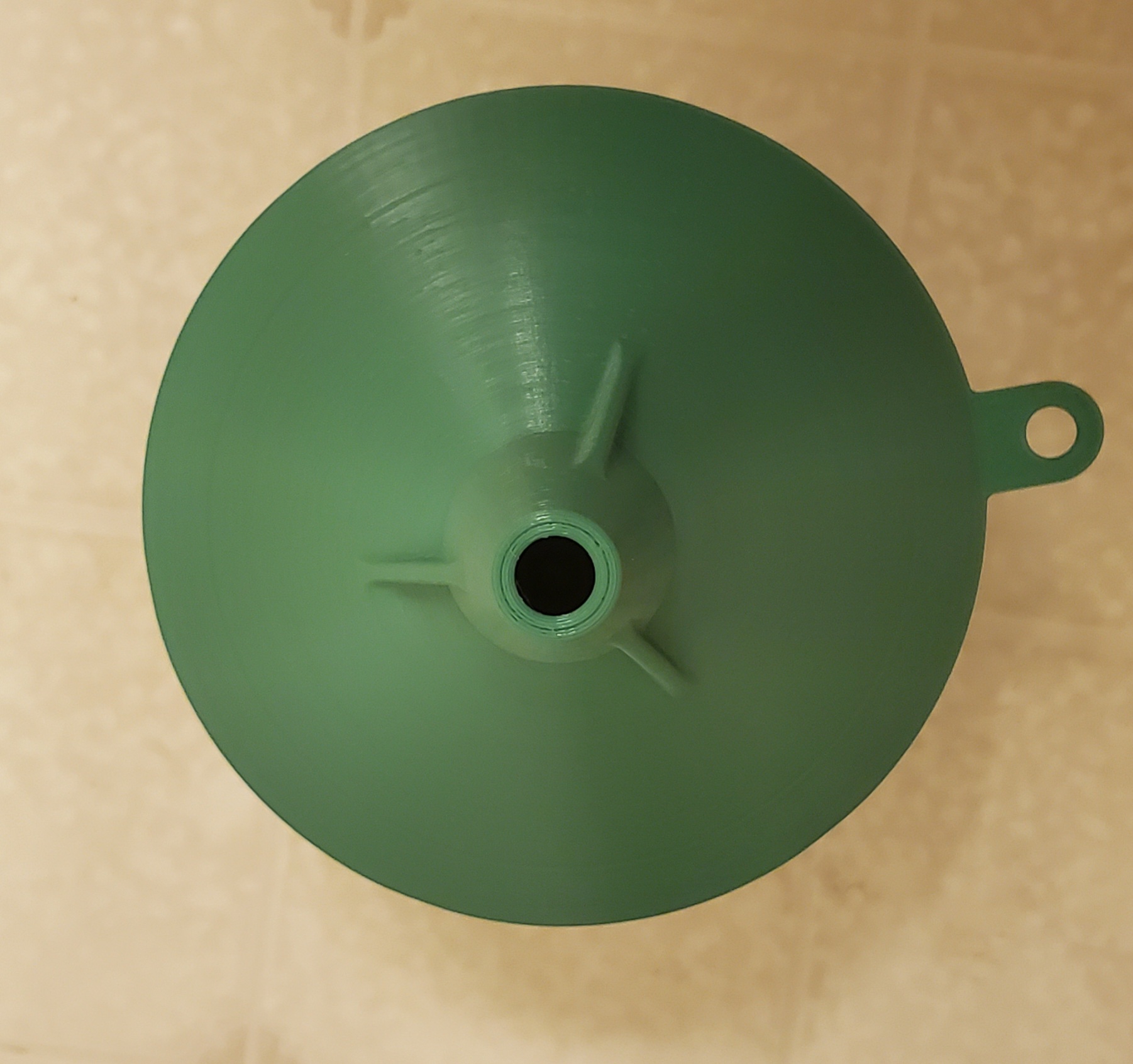
So I printed up this funnel filter. It is for filtering things like cooking oil. It is funnel within a funnel and has holes in the inner portion so that what you are filtering will not just be filtered at the bottom but the sides also..
Here are a couple of pictures of the finished print
And here is the video that octoprint captured during the print. I am not sure how long it took as it ran over night and was done when I came home from work.
I found this on thingiverse Rubber Band Smart Phone Holder. It is Really a tripod for your phone. It is a simple print. Of course I did have to update my build plate as it was having a hard time sticking. That has always been fixed by replacing the magnetic build plate surface. As they do get worn out over time.
Rather then crowd the print I did it in 3 separate prints. The three legs in one print. The phone holder in another and the top of the legs as a third. I used M4*12 Screws and M4 nuts to hold it together. I was a little nervous about the width of the tripod leg holder but the screws pull it all in and they are tight enough not to move but not so tight that I can't change the position.
Well I haven't really posted anything in a while. But I just printed off a phone holder on the 3D Printer. It came out pretty good. Used two different colors for contrast grey and yellow. These two colors look good together.
Well I haven't posted here is quite a while. I have had an interesting period of time with the family having various medical issues and my daughter getting married so I just have not been doing much other then spending all my time and money on those things, But here is a video of a 3D print I did recently.
This is one of those Fidget Infinity Cubes. It is just something that constantly folds up and goes from a square to a rectangle over and over.
So I stack cut the 1/8 front piece with the 1/4 backer piece. This ensures that when I wonder from the line both the front and backer are the same. So it is less noticeable. If I cut them separately and either piece was different it would stand out. This way the mirror each other. Now I can start the inside cuts. Some of this will be challenging some if it will be easy. So let the fun begin
Finally printed the sign pattern out I created a while back for camping. It took 4 sheets of standard 8.5x11 paper. Taped and glued the over hangs now it is ready to be put on wood and cut!
The widest is 20" so it should be fun on a 21" Excalibur. Spinning it should be fun in getting down to the outline
I decided I wanted a camping plaque that reflected my setup directly. So I took a photo of my rig and made a pattern out of it. I created it in inkscape. I actually started using gimp for the first round but then decided converting it to SVG format was too limiting and I could not make easy changes to it since it was not done in a vector graphics program. So I said to myself "Self just do the whole thing in inkscape" So I did. While I don't consider myself a pattern designer I think it is a skill worth developing more of since a total customized pattern is better then one you just modify slightly. I have done other patterns before but I don't do them often. I need to do this more often as I am sure I could get better if I did more. I assume it is much like cutting a pattern the more you do the better you get. There are some parts of the pattern I don't like so I may change it yet before cutting. That is the other problem I have with making patterns. They always need to be tweaked when you look at them Eventually I will cut it and then the changes won't be done anymore.
This is a Sue Mey Pattern I modified to have our last name rather than Welcome. Pattern is available here Happy Campers. It is cut from baltic birch plywood 1/4" for the backer and 1/8" for the design. I have used two finishes on this which I usually don't do. I put my favorite Watco Natural Danish Oil. Then after a few days I put Bullseye Shellac on since this will be outside when we are camping. I figure chances are greater it might get damp and might as well put it on.
The logo I put on with my 3500mw Neje laser engraver. Which I love since it is customized for every use. I just have to modify the graphic with the month year and let it run. I can choose just about any size up to 5.9" (150mm). It is a cheap laser engraver not a cutter so it works for how I use it. I set this one for 3 inches when I printed it.
We bought a Fifth Wheell RV and while the RV is nice. Space is a premium.
So in the bathroom the counter is very small and what do you do with a bar of soap. We looked everywhere for a simple small soap dish. It is just something that you can't find. Oh there are plenty of fancy expensive bar soap dishes but they are all quite large and just not what we wanted.
So what the heck. Just print one up on the 3D Printer. You get everything you want. Size shape and colors.
I just threw this together for my wife. It is just a quick and dirty tray bird feeder. I made it from wood I get from a shipping company down the block from my job. So other then the screws and screening this was a cheap build. Not all that much thought went into it. I did not want to make any hard joints so since I was building in in two layers and putting screening between them the joins are just offset. I actually used a tool that almost never gets used. I bought a biscuit cutter many moons ago and almost never find a reason to use it. This was the perfect job for it. as I was just butting the wood up against each other. So the bottom later is join with biscuits.
So steps was measure the wood lengths I had and decide what length and width to make the frame.. Ended up 1-1/2 inches wide by 14 inches long.
1) Cut wood to width and length in the table saw.
2) Cut the biscuit slots where I was joining the wood on the bottom layer.
3) Glue up the bottom frame
4) Cut the legs at 45 degree angles 3 inches long and attach them with 2 screws each
5) Staple the screening on the bottom frame
6) Screw on the top pieces.
And done.....
Some pics from the build.
Using my custom made frame jig to glue up the bottom.
Legs and screening attached
Top part now screwed on and it is completed
Showing the simple legs I made for this as this will be a ground feeder.
Well I finally have made something from the tree I had cut down last year. I saved a bunch of wood hoping to make something from it one day. Well I started hunting through the stuff I have been seasoning and I cut up a small branch and using both a small hand saw and my small band saw I cut some small boards from it. After getting the hang of how to cut boards I ended up with a couple 3/4" thick ones. It took a couple of try's to figure out how to cut them straight on the band saw. It is small so I can only do 4 1/2 inch high boards but it worked out eventually. For bigger ones It would be more wasteful as I will have to use my chain saw and then planer to get some thin boards.
But this is what I managed to get out of the branch on my first attempt. The next one will yield more boards.
Then I came up with this pattern and sized it for one of the boards and this is the finished product. I used my favorite Natural Danish Oil. I also have finally used my laser burner to put my logo on the backer board. SO this is a live edge on one side and I like how it came out..
So I have at least been successful in using the wood from the really old oak tree that needed to come down last year.
I picked up a Neje laser engraver to sign my work. This will be much improved over using my inkjet printer and wax paper. That was always prone to slipping and being smudged. Which I then would have to sand off. This laser engraver can do just shy of 6" square. I made a few test runs tonight trying to figure out the best settings for power of the laser and speed. I have a good set of numbers for slow printing. I will see if I can find anything that will work under the fast mode.
This is so much better and easier then using my inkjet with wax paper.
Now that the Christmas presents have been given. I am now able to post this. I have a video in here of the entire cutting process. So I have made it as short as I thought I should. They have been sped up. If you think they are long now imagine watching in real time!
By the way have I ever said how much I dislike painting projects? Not for the reason you would think. Not because it hides the wood. It does do that but because I just really don't like painting. I would rather spend days sanding then even a day painting. This project was hours of painting. The final product looks good but man do I dislike painting things when there are multiple surfaces to paint and it is not just cover this with paint.
I decided on designing my own pattern for this years gift. I also decided to cut with an angle to drop the letter into it. It is very interesting to cut at an angle. You start with doing all the 90°. Then if you want the letters to drop in you need to cut the cut at this type of angle \. To be exact what I used was 4° off of 90°. So depending on if your blade tilts or the table tilts that is what determines which way +4° or -4°. I used a Flying Dutchman 5 ultra reverse blade so with the kerf of that bade and 4° tilt I get about 3/16" inset. If I went the other way I would get a 3/16" outset. So I wanted to to drop. The main reason is then I was able to sand down the letter backs sticking out the back to make them flush with the board. To drop you must remember that the cut needs to be wider at the top with the kerf cut it will cause the shape to fall in and eventual jam in place. You just put glue on it and push the shape in and let it dry.
Here is the pattern I created. You can freely use this pattern. The only restrictions I place on this is that you can not sell the pattern. You can give the pattern away you just can't sell the pattern. You can always sell the item you make if that is what you wan to do.
I have two versions of the pattern. One that is the full pattern and one that is the pattern split in two pieces. This is 14 3/4 wide so you will need to piece it together or print it to fit on a legal size sheet of paper. I made the outlines red simply because I like to follow red rather then black lines. As I get older I lose the blade in black. While I can see it clearly against a red background. You cut the outside at 90 and cut the letters at either 94 or 86 depending on if your table tilts or the blade tilts. Also depending on if you want outset or inset letters
You also need to remember when you drill your holes to drill them at the same angle.
Here are the patterns
Full
Two halves
Here is the video of my cutting one of these.
Some single shots of the project
The frame and letters v\cut out with the pattern still attached
All cut and pattern removed. I numbed the pieces not so much to tell where they go but so when I was painting them I would paint the proper side. You would be surprised to know how often I would have the wrong side facing me.
All glued up and mostly painted. Sanding down the letters now. The one in the back sis all sanded down while the one in front is up next to sand.
I used a belt sander to take the bulk off then I used a random orbit sander to do the final bit to smoth it out.
For the final look at the front and back of a couple of the finished ones.
I needed to make a perfect circle so I made a circle jig for my router. I can do a 4 foot circle with this. I do need to make a 40" circle so it will be used almost to the full range.
I just took off the face plate and traced it. I then used by power strop for the smaller circle and drew lines between the two circles. I cut it out on my scroll saw. Then I mounted it to the router and let the router drill the hole. I marked off 1/2" distances from the edge of the bit.
Now to make a circle. But I won't get to that till next year since I am out of time and my van was in the shop so I could not pick up the ply to cut the circle. Now Christmas is upon me I won't be able to get it done before I have to leave town. So next year! I have my first project awaiting me already!
Yes it is that time of year. I am working on one of my own designs this year. Trying something new with angle cutting on the scroll saw. The idea is to have the pieces drop into the work piece to give a 3d effect. All it takes is a 4° angle, When you make the cut it will be sort of like \ /. As you see it is wider at the top of the cut the the bottom. Which with the blade kerf means the shape you cut will drop in and stop. If you were to change the angle to be the opposite way / \. The shape would come out and stop. It so happens that 4° will give you about 3/16" level change either out or in depending on which way you cut the object. You do have to put glue on the piece to keep it in place. SO since the kerf helps to set the distance the size of your blade will also determine how far it moves. I almost always use a Ultra Reverse #5 for everything that is not fret work.
The tough thing can be drilling the hole at 4°. But I happen to have a setup that is almost a perfect 4° so I can drill the holes at the right angle. The small drill press I have can not hold the very small drill bits but it is easily set at 4°. But I have block of wood I place next to my dremel dill press which happens to create the 4° angle.
If you have it pop out it will leave a depression in the back. Likewise if you drop in it will stick out the back. If you drop it out the back you can sand/plane it off so that the back will be flat. Or you can just leave it hang out the back.
Sometimes when you come across a pattern that says self framing this is what will be done. You will cut at a 4° angle or so and the outer edge will come forward providing you with a built in frame.
You can vary the angle which will vary the amount the piece comes out of goes in. Like I said a 4° will give you about 3/16" drop or pop with a ultra reverse #5
Anyway no pictures till after Christmas. Hopefully what I have said will make sense to you.
Well I found out I won First Place for the fourth time in four years! The number of goofs that I had to repair and or change the cut was above average for me. As a previous post explained my bottom clamp on the saw was breaking and thus why the goofs. The tension on the blade was not as tight as it should have been and finally just before the end it broke and would not hold the blade at all on the bottom. Then I worked out a solution to clamp the blade while waiting on the new bottom clamp.
I always say mistakes happen patterns are a guide. If something goes wrong examine the mistake and see how you can change the cut so that it is no longer is an issue and still looks like it belongs.
I dropped my entry off at the NC State Fair over the weekend. Judging was today Tuesday the 15th. So by now I have most likely won a ribbon. It is the same people every year that enter. I was able to gaze at the list of entries in the book when I dropped it off and I saw all the usual names for the competition this year. Eventually I will not get the blue ribbon. Maybe this year as the flaws are plenty. I seemed to have to hide more mistakes this year then in years past. Well I will know this week probably if someone I know goes before I do to the fair.
I need a new phone as the camera in my current phone has a broken lens so I try not to take pictures but this one was taken with the phone. Ignore the strange artifacts in the pic
This is a shot of where I dropped the entry off. You can see a ferris wheel in the background. But this year they have this massive ferris wheel that makes this one look tiny.